What counts as down?
By default, WebsitePulse marks a site as down when it gets a server error or no response at all. You can also turn on additional conditions to catch things like maintenance mode.
Default conditions (always on)
- HTTP errors (400 and above) — if your server returns a 400, 404, 500, or similar error code, your site is marked as down.
- Connection timeout — if your site does not respond within 10 seconds, it is marked as down.
Optional conditions (off by default)
These can be turned on per monitor in the monitor settings. Click the settings cog next to any monitor on your overview page.
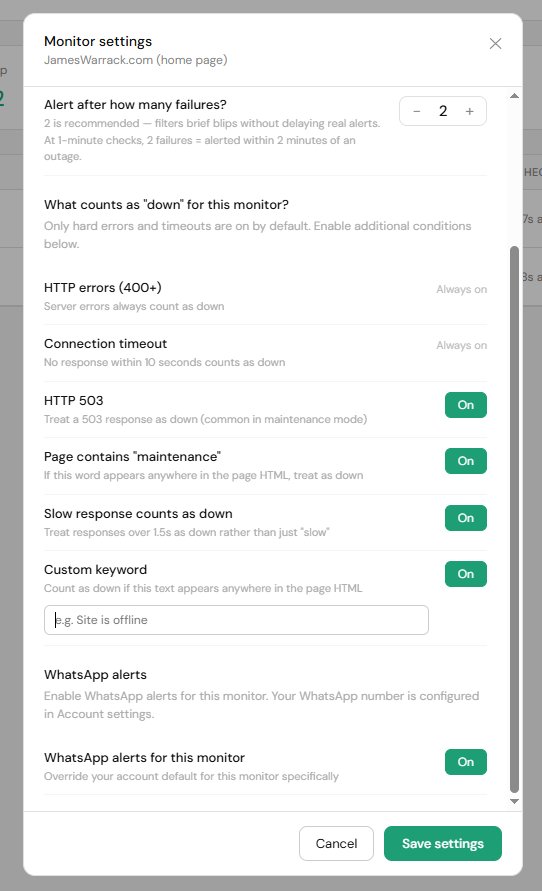
- HTTP 503 — treats a 503 response as down. Useful if your site serves a maintenance page with a 503 status code.
- Page contains "maintenance" — if the word "maintenance" appears anywhere in your page HTML, the site is marked as down. Useful for WordPress maintenance plugins that return a 200 status.
- Slow response counts as down — treats responses over 1.5 seconds as down rather than just "slow".
- Custom keyword — you choose a word or phrase. If it appears anywhere in the page HTML, the site is marked as down.
If your site uses aggressive page caching, keyword detection may not work reliably until the cache expires. WebsitePulse sends cache-busting headers with every request to minimise this.
What does "slow" mean?
If your site responds but takes longer than 1.5 seconds, it is marked as "slow" rather than "down". You will see this as an amber indicator on your dashboard. You can optionally treat slow responses as down in your monitor settings.